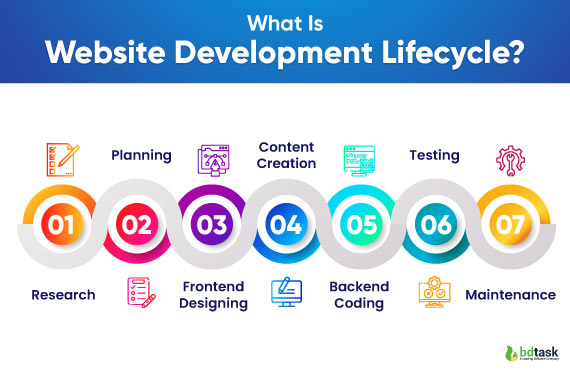
The Website Development Lifecycle
is an organized structure outlining the processes involved in the development and maintenance of a website. It makes the development process efficient, well-structured, and productive, which will ultimately produce a product of quality and meet users' and businesses' requirements. There are usually five stages that define the website development lifecycle as follows:
1. Requirement Analysis
- Objective Definition: Purpose of the website (example: business promotion, e-commerce, information sharing).
- Audience Identification: Identify the target audience and their needs.
- Functional Requirements: Identify key features such as forms, user accounts, e-commerce capabilities, etc.
- Technical Requirements: Define hosting, domain, security, and scalability needs.
- Functional Requirements: Identify key features such as forms, user accounts, e-commerce capabilities, etc.
- Technical Requirements: Define hosting, domain, security, and scalability needs.
- Functional Requirements: Identify key features such as forms, user accounts, e-commerce capabilities, etc.
- Technical Requirements: Define hosting, domain, security, and scalability needs.
2. Planning
- Project Scope: Define the timeline, milestones, and resources.
- Site Architecture: Outline the structure of the website, including the sitemap and page hierarchy.
- Technology Stack: Select tools, frameworks, and programming languages (e.g., HTML, CSS, JavaScript, PHP, Python).
- Team Allocation: Assign Designer, Developer, and tester roles.
3. Design
- Wireframes: low-fidelity layouts that illustrate the wireframe structure and placement.
- Prototypes: interactive model to visualize user journeys and functionality.
- UI/UX Designing: website appearance (UI) and ease of navigation (UX)
- StakeholderFeedback: Collect and implement feedbacks on the designing.
4. Development
- Front-End Development : building the UI using HTMl, CSS and JavaScript.
- Back-End Development: This is the development of server-side logic, databases, and APIs that govern data processing and storage.
- Integration: Connect the front-end and back-end
- Responsive Design: Ensure the website works on various devices and screen sizes.
5. Testing
- Functionality Testing: All features such as forms, buttons, and navigation should work.
- Compatibility Testing: The website must run smoothly on different browsers and devices.
- Performance Testing: It measures load times and improves for speed.
- Security Testing: Look for vulnerabilities and deploy measures like SSL and firewalls.
- User Acceptance Testing (UAT): Test with real users to ensure it meets expectations.
6. Launch
- Deployment: Make the website live on the server and set up the domain settings.
- Monitoring: Start monitoring the website's performance and fix any immediate problems.
- Promotion: Marketing campaigns, social media, and email should be informed of the launch.
7. Maintenance
- Bug Fixes: Fix bugs as they happen after the launch.
- Content Updates: The content added or updated keeps the site relevant.
- Feature Upgrades: New features are added based on feedback from users or business growth.
- Performance Monitoring: Through analytics tools, track traffic, conversions, and bounce rates.
- Security Updates: Software and plugins are kept updated regularly to prevent vulnerabilities.


No comments:
Post a Comment